Archives

gravatar

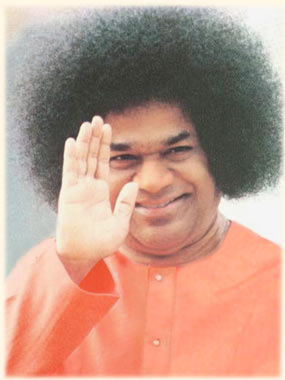
Sathya Sai Baba


Sai Baba

Yesterday world woke up hearing the sad news about Satya Sai. Many would be wondering how I can believe in such human gods? In fact, I don’t. As per the philosophy, for a hungry man, food is GOD. So, Sathya Sai provided free medical treatment, Surgeries, Water projects to not millions, but billions. So he is GOD.

Some people talk in such a way that the definition of GOD is man who does miracles. Yes, Satya Sai did that miracle, he fed the empty stomach, treated the poor and provided spiritual advice to millions. Remember we are living in a age where people are just concerned only about them. How I can make more money. For Eg, Raja. He was the elected representative of the people for the people and by the people. He was suppose to serve the people. Instead, he served many corporate companies and took his share of profit. That profit alone is required to provide free food for the entire Indian population for the next 60 years.

This website provides good info about Sai Baba: 

So who is Satya Sai? Few insights into Satya Sai -

Sathya Sai Baba is the figurehead to a number of free educational institutions, charitable organizations and service projects that are spread over 10,000 centers in 166 countries around the world. It is a Rs 40,000 crore empire. Sathya Sai Baba supports free schools and other charitable works in 166 countries
The Sri Sathya Sai Institute of Higher Learning in Prashanti Nilayam is the only college in India to have received an "A++" rating by the National Assessment and Accreditation Council

The Sri Sathya Sai Institute of Higher Medical Sciences in Puttaparthi (also known as the Super Specialty Hospital) is a 220 bed facility providing advanced surgical and medical care free of cost to the public.

The Sri Sathya Sai Institute of Higher Medical Sciences in Bangalore is a 333 bed facility with advanced operation theatres, ICUs and CCUs meant to benefit the poor.The hospital has served 250,000 patients, free of cost, from January 2001 to April 2004.

The Sri Sathya Sai General Hospital was opened in Whitefield, Bangalore, in 1977 by Sathya Sai Baba to provide free care to poor local villagers.It is a 35,000 sq ft (3,300 m2) building thatprovides complex surgeries, food and medicines free of cost. The hospital has, since its inception, treated over 2 million cases.

The Sri Sathya Sai Central Trust runs several general hospitals, two super specialty hospitals, dispensaries, eye hospitals and mobile dispensaries and conducts medical camps in rural and slum areas in India

The Trust has also funded several major drinking water projects. The first drinking water project, completed in 1996, supplies water to 1.2 million people in 730-800 villages in the drought-prone Anantapur district in Andhra Pradesh.The second drinking water project, completed in 2004, supplies water to Chennai (formerly known as Madras) through a rebuilt waterway named "Sathya Sai Ganga Canal".The third drinking water project would supply water from the Godavari River to half a million people living in five hundred villages in East and West Godavari Districts. Other completed water projects include the Medak District Project benefiting 450,000 people in 179 villages and the Mahbubnagar District Project benefiting 350,000 people in 141 villages. 

gravatar

20 Ways to Use Gmail Filters - by Leo Babauta

One of the coolest things about Gmail is its filters — set up properly, filters can add loads of functionality to your already-powerful Gmail account. Save time and space, rid your inbox of unwanted emails, and turn your Gmail into a multi-functional tool with simple filters.

There are some limitations to Gmail's filters that I'd like to see improved in the future, including:

·         the inability to mark a post as read

·         the inability to create live "smart folders"

·         difficulty in adding a large number of email addresses to a filter

But all in all, the filter function is very cool. Here are some ideas for how to use it:

·         Killfile. If people send me too much junk mail (jokes, chain mail, etc.), they get added to my killfile. It's a simple filter that looks at the "from" field and deletes the message if it's one of the addresses I've added to the filter. Every now and then I'll decide to add someone to my killfile, and I'll just open up the filter and add their address.

·         Booleans. The filter works much like Gmail's search function, in that you can add search terms such as AND or OR or NOT. So I can look for addresses that are from a number of people (using OR), or emails that must include all of the words on a list (using AND). Use search operator symbols to make it even easier: "|" for OR, space for AND, "-" for NOT, and parentheses to group different terms in your search string.

·         Other search terms. Beyond the common terms above, your filters can use other terms such as "from:", "to:", "has:", "is:", "filename:", and "label:", among others. Using these terms, you can make your filters even more powerful.

·         Send reminders to someone. One of the things I wish Google would add to Gmail is the ability to send a delayed email. This would allow me to send reminders to someone at regular times. Instead, I sign up for a reminder email service to send reminders (meant for other people) to my gmail address, and then set up filters to forward the reminders to various people depending on the subject or content of the email. It's not perfect, but it allows me to send reminders to different people on a regular basis.

·         Calendar and log. I set up Google Calendar to send me reminders of events. You can set up a label ("events") so that your calendar reminders go straight to the label, star the message, and skip the inbox. Now not only are your events in one place, instead of scattered through your inbox, you can unstar the message when you complete the task or event, and now you also have a log of all the things you've done.

·         To-dos. This is a commonly used function, but you can email yourself tasks that you need to do, and then set up a filter that has your email address in both the "to" and "from" boxes, that applies the label "to-do" to the message. This will allow you to view all your to-dos in one filter. Or, if you're a GTD fan, you could set up to-dos for each context (@work, @home, @errands, @phone, etc.), by creating different labels for each, and then setting up filters for different email addresses. Email yourself at yourname+work (you don't need the @gmail.com part), and set up the filter to label that address "@work", and so on for each context.

·         Follow up. Even if you're not a GTD fan, having a follow-up label is a must. Simply set up a filter with an email address such as "youname+follow" and put it in the "has the words" filter field, and have this filter label it "@follow" and skip the inbox. Now when you send out an email that needs to be followed up on, put yourname+follow in the "bcc" field, and it'll go into your "@follow" label. Be sure to check this label once a day so you can follow up on your emails.

·         Send spam to trash. Instead of having Gmail-filtered spam go into your Spam folder (and have the annoying count of unread spam by the folder's name), set up a filter with "is:spam" in the "has the words" field (just click "OK" on Gmail's warning dialog box when you click next step) and "Delete it" as the action. Now all spam messages will go in your trash.

·         Archived bookmarks. If you use del.icio.us and other bookmarking services, you can archive them all in a Gmail label ("bookmarks"). Get the feed urls for each of your bookmarking services, enter them in a forwarding service such as rssfwd.com, and then set up a filter to label them all "bookmarks". Now all your bookmarks are in one place, with Gmail's great search.

·         Attachments. If you're like me, you like to go through your old emails and delete a bunch of them at a time. I do common searches during the cleanup process, such as "has:attachment", so that I can look through all my bigger emails and delete them. Make this process quicker by making a label and filter for this search, and for any of your common searches, for that matter.

·         Media. If you get a lot of media sent to you, such as music files, videos and photos, set up filters ("filename:wmv | filename:mov" for videos, "filename:mp3″ for music, filename:jpg | filename:gif" for photos, or "filename:pdf | filename:doc" for documents). Now you can quickly find any media.

·         Backups. Create a second Gmail account for storage, and create a filter to automatically forward any emails with attachments ("has:attachments") to this second address. Now you can delete your old emails without guilt or worry.

·         Newsgroups or feeds. You can set up filters for your newsgroups, so they don't clog up your inbox. Or forward your favorite feeds to your Gmail, and automatically label and archive them for later reading. Now you can not only access them from anywhere, but you can search them too.

·         Bloggers. If you run a blog, you can have all your blog's comments and pingbacks automatically archived and labeled ("blog"), so your inbox doesn't get filled up fast. Also have your blog stat reports mailed to you and shunted to this label, so you can get a quick look at your blog's success at a glance.

·         Delete old sent emails. There's no reason, in most cases, to keep your really old sent emails. Delete them. Create a filter with "before:2006/06/01 label:sent" with "Delete it" as the action (you'll need to click "OK" to Gmail's warning dialog). Every month or so, update the date of this filter.

·         No delete. Some emails you don't want to delete — those precious ones from your kids, for example, or maybe ones from your boss. Set up a label ("nodelete") and a filter that puts the nodelete label on emails from (or to) the addresses you want. Now, some of the above filters, add the string "-nodelete" so that it doesn't show these emails. Now you can delete your old sent emails, or your attachment emails, for example, without worry that your kids' or boss' emails will be trashed along with the rest of the riffraff.

·         Flickr. Forward your Flickr account's feed to your Gmail, with a filter to automatically label it, and now your photos are searchable through Gmail. You can also set up filters to send notices that certain tags in your Flickr account has new photos to certain relatives.

·         Notes. Email yourself notes on web research, on meetings, on books you're reading, on classes you're taking. Set up a filter to archive and label them (if you send notes to yourname+notes, for example). Now they're searchable and archived and accessible from anywhere.

·         Twitter. Use your mobile phone to send text messages or IM messages to Twitter, with a keyword at the beginning of each Twitter message (NOTE, TODO, BLOG, FOLLOW, etc.). Forward your Twitter account's feed to your Gmail, and set up filters for each type of keyword ("note twitter" will be labeled "note" for example). Now you can use your mobile device to send notes, to-dos, follow-up reminders and more to your Gmail through Twitter.

·         Wildcard. Use the wildcard character (*) for companies that use multiple types of address from the same domain. One great use I've seen is to use the wildcard character for vendors such as Amazon or eBay to make it easier to track online purchases. Create a label ("online shopping") and a filter with such email addresses as "*@amazon.com|*@ebay.com|*@paypal.com|*@barnesandnoble.com".

Original Link: Click here


gravatar

Job mails - Job Frauds - www.icicihire.com

This time I got an email, as if from ICICI bank HR dept, to send in my resume for various posts starting from Cleaner to President. Such idiots still exist in this earth!!! The entire email is very much similar like our old reliancevacancies.com emails.

The person's name changed - from Roger Turner to Thomas Dsouza.. may be change in management :)


How ever, both follow the same "thought of the day" quote - ‘Nothing great was ever achieved without enthusiasm’


Just wondering how people can survive on such frauds... should quit my job and try such excellent ideas...

<<<<<<<<<<<<>>>>>>>>>>>>>>>>>>>>>>>


fromICICI Career 
to
dateTue, Mar 22, 2011 at 12:32 PM
subjectRequirements in Accounts/ Finance/ Tax & Audit
mailed-byyahoo.com
signed-byyahoo.com

hide details 12:32 PM (1 hour ago)
Requirements in Accounts/ Finance/ Tax & Audit
Dear Sir/ Madam,
This is to inform you that we are hiring candidates for Accounts/ Finance/ Tax & Audit .

Following are the requirements. Only interested candidates to find further details and location please login to www.icicihire.com and post your latest tailor made resume according to job.

Current Requirements :
Accounts Executive
Sr. Manager Taxation
Manager Finance & Administration
ASSISTANT MANAGER ACCOUNTS
Senior Manager / Chief Manager - Head Internal
Audit for Corporate
Finance Manager
Payroll/Tax Service - Manager.
Sr.Executive/Assistant Manager/Manager - Fiscal
Accountants Executive
Intercompany Reconciliation Analyst
Centre Accountant (Malad & Kandivali)
Senior Manager -Banking & Financial Management
Coromandel
INTERNAL AUDIT TEAM LEADERS-
Sr. Accountant
ASSOCIATE [CORPORATE]
Senior Accountant
Junior Accountant
Finance & Accounts Officer(Automobile Industry)
Financial Controller / Accounts Manager/ Accountant

With Best regards
Thomas Dsouza

Note : You are getting this mail as you are registered with us. If you do not wish further notifications please mail us subject : unregister to HYPERLINK "mailto: accounts.hrworld@gmail.com" accounts.hrworld@gmail.com

Thought of the day
'Nothing great was ever achieved without enthusiasm'

The sender of this email is a recruiter. You are getting this mail as you have registered with us. Please note that we DONOT endorse any requests for money payments, or sharing of bank account details etc.etc.
To receive further information on new job openings please mark this mail as "not spam" in your email account.


gravatar

Android Wifi issues - No solution till now.

Think before you buy
My issues with the Android OS is continuing. Wifi is unable to provide a trouble free performance. Just wondering at many messages saying Android is a superior operating system. If some one asks me, I will tell this is crap. This is the worst performing OS i have ever seen (after Symbian). The scrolling is not as smooth as iPhone, there are bugs every where in the software. I think our beloved Google has lost count on the number of bugs Android is having. Will be using this phone for a couple of months, before listing it on eBay.

Just laughed a lot yesterday, when a hardcore Android fan sent me a message saying that this is a long resolved issue. Come on, how can a long resolved issue be there in the Android phone i bought two weeks back with factory loaded Android Froyo 2.2? You must support your favorite OS, but must accept the demerits of the same.


Yesterday read the latest issue of Stuff and was really amused at how they were going on explaining the merits of Android OS over iOS. Infact, after reading many reviews and articles, I went and bought the new Dell Streak running factory loaded Android Froyo 2.2 two weeks back. I was using iphone 3GS for the last 1 year and pretty much satisfied with its performance. But gave it up to experience the so called superior OS – Android.
Buy Android and face "no solution yet" issues


After I bought Android, I started to realize the demerits of that OS over iphone OS. The first and foremost issue that started annoying me was related to WIFI. Googling the same provided some insights into that issue. A million more people are also affected by the wifi issues starting from Android 1.4. I initially thought this was a problem with Streak. But reading forum after forum, blog after blog I came to the conclusion that this issue is not unique to streak. Even Nexus one, Droid, Samsung galaxy and galaxy tab, all are having the same issue. Dell is purposefully taking out the wifi issue related complaint I raised in the forum – may be because I raised the issue in the US forum and am located in UAE.

If wifi was my problem, another group was having issue like phone freezing soon after getting a call or sms. Some having problem with Bluetooth, some with applications crashing. My wifi issue was strange. Even if my default connection is there, android will go on searching for the network and finally disconnects itself. The Default connection status will be "disabled" or "disconnected". You can check the same in the youtube video  (caught with my iphone). 

Every time after wakeup (phone waking up from sleep mode), the connection with the default connection will be disabled in spite of whatever you set in the wifi sleep policy menu.

No idea why Google is not providing bug fixes. I saw many work arounds in the google android market. From many forums I learned that many people are cashing in on this bug by providing fixes – some work, some wont. Thank god, only free applications are available in the android market in UAE. Else I would have spent more money buying fixes. Google is going on developing new  versions of existing buggy OS. I said this because, even after the introduction of 2.2, this issue is not cleared. I can very well say that Android will sure grow in numbers. This is not because the OS is very good and Bug free, but there are phones as cheap as 500dhs running android. So anyone can afford android and they will definitely  go for an android smartphone. However, the bug free environment (I squeeze my iPhone with applications and it has never let me down) and the glitch free performance of iPhone can never be repeated by an Android Phone. I can’t find any issue in iphone software-wise as well as after dropping the phone for almost 6 times.


Android bugs
History repeats – It was microsoft windows with 90% market and we always complained about the bugs in the OS. Still it used to be the number one OS in the market – not because of performance, but because it was cheap to own a windows powered PC/ lap – any next door geek can build you one. But Apple OSX was best – performance wise, but it never came to the top position because not all can afford an apple. Similarly, Android will be the top selling OS even with all the bugs and issues. Because we always tend to forget some problems for a few bucks we save!

Totally disappointed with the performance of Android.


gravatar

Honda City versus Volkswagen Vento

Honda City versus Volkswagen Vento


original article: Click here

Heavy lies the head that wears the crown. It’s an old saying. The Honda City has ruled the roost with an invincible dominance of the premium C-segment. Who could fault its combination of attributes: style , the Honda badge , good fuel-efficiency , effortless performance and the aura of being the ‘Car of the Year’? The swagger was inevitable.
But then stepping out of the shadows and into the spotlight comes a car with huge ambitions. The Volkswagen Vento is a car we’ve all been waiting for. We drove it and loved it. Now it must scale the ramparts of Fort Honda in an attempt to usurp the crown.
Beauty , ‘tis said , lies in the eyes of the beholder. The Vento is the newcomer here , yet , in my eyes , the City is the better looking of the two. That’s not to fault the VW in any way; its taut lines and crisp detailing are austere. In comparison , the City appears festive. Open and shut the doors to feel the difference. While the current City is a big step up from its tinny-feeling predecessors , the Vento feels like a mini tank in comparison.
It is when you step inside that the Vento appears to unleash a series of fast jabs. I’ve never been a fan of the City’s interior. Its plastics and colour scheme never did appeal to me. In comparison , the black interior with chrome highlights on the Vento look so much more appealing. Yes , some of the buttons , like those for climate control , feel a bit old-school and straight from Volkswagen AG’s parts bin , but just run your hands over the dashboard to feel the grain and texture and you immediately know the difference. Use any of the switchgear and this sense of quality gets only heightened.
The City has nicer looking upholstery , though , and the seat cushions are softer into the bargain. While the City may feel plusher at first , it is the Vento which will be more widely recommended by the chiropractor. Both have amazingly voluminous interiors , but the City just ‘out-spaces’ the Vento in rear knee room , recording a maximum of 930 mm to the German’s 890 mm.
On the move , the two cars transcribe completely different sensations to your being. Honda’s iVTEC engine is a jewel , endowing it with remarkable flexibility. Numbers don’t lie and the City out-punches the Vento in every department. Not only is it over a second quicker in the sprint to 100 km/h , it takes six seconds less in the fourth-gear slog from 40 to 100 km/h. The braking figures are similarly much better in the case of the City , although , to be fair , the Vento was hampered by a damp surface and our test car was not equipped with the anti-lock braking system (ABS).
In terms of numbers alone , the Vento suffers a bloody nose at the hands of the City. Then there’s fuel-efficiency. Despite producing greater outright power , the Honda engine is much more fuel-efficient too , returning 17.7 km per litre overall to the Vento’s 14.1 kpl , which is a difference of more than 20 per cent. Simply put , for every fivekilometres you’ll travel in a Vento , you’ll do six in the City. That the City sounds nicer when revved up is an added bonus.
But then there are other aspects to be considered too. The Vento is a better car to steer , for example. The feel through the ‘wheel is better judged and more precise , which is a good thing when you’re at speed on the highway. In comparison , the City’s lighter steering might not feel as confidence-inspiring on the highway , but it is much easier to steer through traffic. The Vento fights back with a better ride quality too , especially over the jarring sharp-edged potholes of our monsoon-ravaged roads. You need to watch out for the Vento’s nose , though , which has a pronounced overhang like its little sibling Polo.
Thus far , this is a fight which has been progressing from round to round with both throwing some heavy punches. But is there a knock-out waiting to be delivered?
Just as the City appears to be taking a breather after a frantic rounds early on , the Vento unleashes a left hook that just might stop the king in its tracks: price. At Rs 9.26 lakh (OTR , Pune) , the German car is a cool Rs 1 lakh cheaper than the Honda City. Spec for spec , the two are evenly matched , with the Vento actually having bonuses such as climate control and a seat adjustment lever in the rear. One hundred thousand rupees is no laughing matter , mind , and for value , the Vento has the City licked.
This bout will have to be called on technicalities; neither party seems to be able to knock the other to the canvas just yet. It’s been hard and fast , bloody and thrilling. A match well fought and fought fair. In the end , though , by a hair’s breadth , I’d hand it to the Vento. The City is a staggeringly good car , but the Vento’s no pushover either. At Rs 9.26 lakh , it’s almost a bargain in comparison.

>